If you assign licenses in Office 365, you’re essentially assigning license bundles. Each license usually consists of several sublicenses, like this:
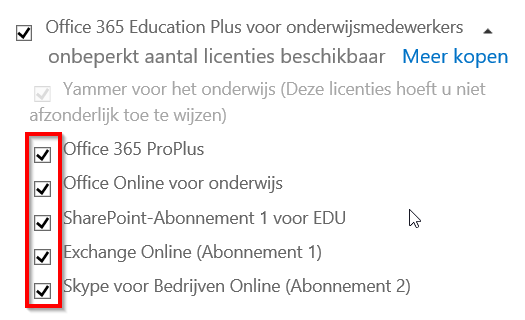
In a case I ran into for a customer, the ‘Exchange Online’ component was sometimes not enabled for certain users. It took us a while to notice that the serviceplan of the main license had been unchecked. In Powershell, it would normally look like this:
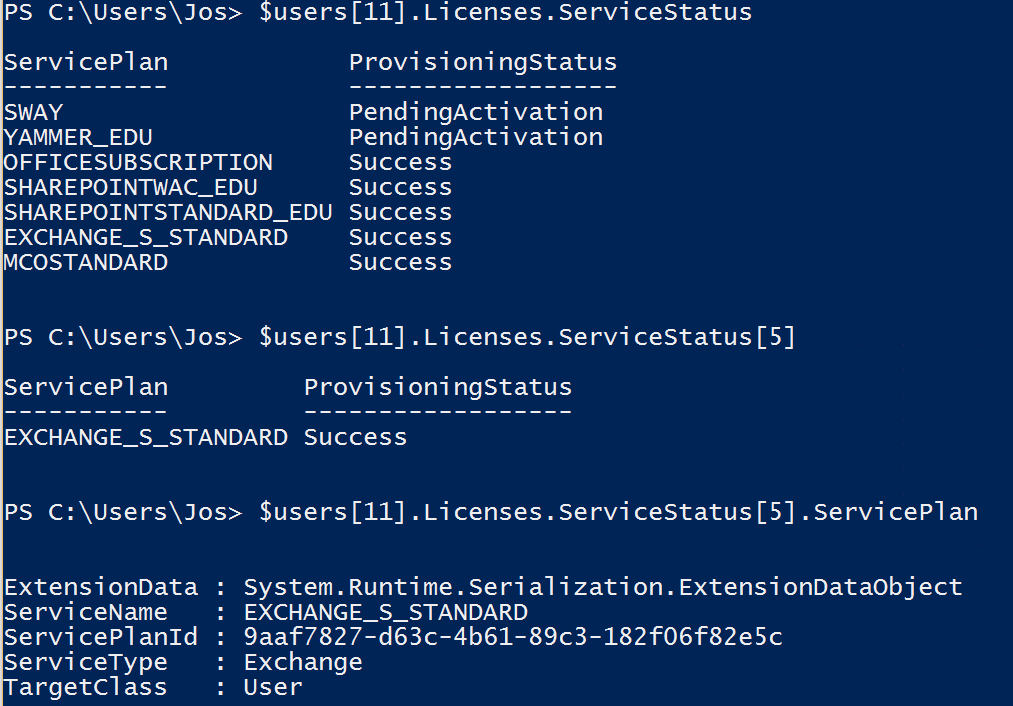
Of course now we’d like to know which of our thousands of users did not have a EXCHANGE _S_STANDARD ServicePlan with a ProvisioningStatus of “Success” after the migration to Office 365.
So, I wrote the following Powershell snippet to determine which users did not have the specified plan enabled:
$users = Get-Msoluser -All
$fouten = 0
foreach ($user in $users){

$heeftExchange = $False
$staatAan = $False
foreach($service in $user.Licenses.ServiceStatus){
if($service.ServicePlan.ServiceName -like "EXCHANGE*"){
$heeftExchange = $True
if($Service.ProvisioningStatus -eq "Success"){
$staatAan = $True
}
}
}
if($heeftExchange -eq $False -or $staatAan -eq $False){
Write-Host "$($user.UserPrincipalName) does not have a service plan!"
$fouten++
}

}

write-host "Errors: $fouten / $($users.Count)"